Designing a mold with a cavity is the process of creating the "negative" space that will eventually become your physical product. Think of it like a high-tech waffle iron—the cavity is the part that gives the waffle its shape.
Here is the engineering workflow for designing a cavity-based mold.
1. Determining the Parting Line
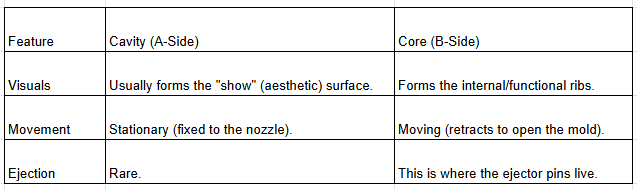
The parting line is the plane where the two halves of the mold (the Cavity/A-side and the Core/B-side) meet.
Location: Ideally, place it on the sharpest edge of the part to hide the "witness mark" (the faint line left by the mold).
Function: It must allow the part to be ejected without getting trapped. If your part has a bulge in the middle, the parting line must sit at the widest point.
2. Creating the "Subtract" (Boolean)
In CAD software (like SolidWorks or Fusion 360), you don't "draw" the cavity manually. Instead, you use a Boolean Subtract operation:
Model your finished plastic part.
Scale the part up slightly to account for Shrinkage. Different plastics shrink at different rates (e.g., Polypropylene shrinks about 1.5% to 2%).
Place a solid block of steel/aluminum around the part.
"Subtract" the part from the block. The remaining void in the block is your Cavity.
3. Incorporating Draft Angles
Without draft, the vacuum and friction created during cooling will make it impossible to remove the part without damaging it.
The Rule of Thumb: Minimum 0.5° for smooth surfaces, but 1.5° to 3° is standard.
Texture: If the cavity has a leather or matte texture, you need an additional 1° of draft for every 0.025mm of texture depth.
4. The Feed System: Runners and Gates
The cavity needs a "door" for the plastic to enter.
The Gate: This is the narrow entrance into the cavity. It should be located at the thickest section of the part so the plastic flows toward the thinner sections.
The Runner: This is the tunnel that carries molten plastic from the machine nozzle to the gate. A "trapezoidal" or "full round" runner profile is best for maintaining pressure.
5. Managing the "Air" (Venting)
As plastic rushes into the cavity, the air already inside has nowhere to go. If it gets trapped, it compresses, heats up, and burns the plastic (called a Burn Mark).
Vents: You must grind tiny channels (usually only 0.01mm to 0.05mm deep) at the end of the fill paths. These are small enough for air to escape but too small for thick plastic to enter.
6. Cooling Logic
The cavity side usually stays on the "stationary" side of the machine. You must design water lines that wrap around the cavity to pull heat away.
Conformal Cooling: In high-end molds, these channels follow the exact contour of the cavity for perfectly even cooling.
Summary Table: Cavity vs. Core