
How to create 3d models for printing?
Creating 3D models for 3D printing (additive manufacturing) is straightforward once you know the workflow. Here's a complete step-by-step guide that works whether you're a complete beginner or already have some experience.
1. Choose Your Approach

2. Learn the Rules for “Print Ready” Models
A model must be:
Watertight (manifold) – No holes or gaps in the mesh.
No inverted normals – All faces point outward.
Proper scale – Usually in millimeters (e.g., 100 mm = 10 cm in real life).
Minimum wall thickness – Typically ≥0.8–1 mm for plastics, ≥1–2 mm for resins.
Overhangs<45° need supports or should be avoided/redesigned.
No intersecting geometry inside the same part.
3. Recommended Free Software Stack (2025)
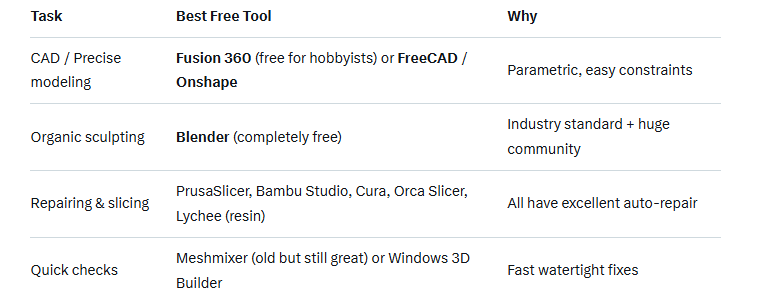
4. Step-by-Step Workflow (Most Common)
Step 1: Model or download
Create in Blender/Fusion 360/FreeCAD, etc.OR download from Thingiverse, Printables.com, MakerWorld, Cults3D, MyMiniFactory (check license!).
Step 2: Make it manifold & printable
In Blender (most common free route):Enter Edit mode → Mesh → Clean Up → Merge by Distance (removes duplicate vertices)Select all → Mesh → Normals → Recalculate Outside (Ctrl+N)
Add the free “3D Print Toolbox” add-on (built-in)Go to Analysis tab → Check “Non-Manifold”, “Intersect”, “Thin”, etc. → Fix issuesExport as .STL or .3MF
Step 3: Slice & add supports
Open in PrusaSlicer / Orca Slicer / Cura / Bambu Studio.The slicer will warn you about thin walls or non-manifold edges.Set layer height (0.1–0.3 mm typical), infill (5–30%), supports if needed.Export G-code to printer or SD card
5. Quick Start Tutorials (2025 recommendations)
Fusion 360 beginner → “Product Design Online” YouTube channel
Blender hard-surface modeling → Grant Abbitt, Josh Gambrell
Blender sculpting → Grant Abbitt “Blender for 3D Printing” playlist
Making supports easy → Teaching Tech’s “Support Settings Guide” (works in all slicers)
6. Common Rookie Mistakes to Avoid
Exporting in centimeters instead of millimeters (model becomes 10× too big/small)
Tiny details thinner than your nozzle (usually 0.4 mm)
Forgetting to add drainage holes in resin prints
Ignoring “YHT” rule for overhangs (You Have To support anything beyond ~45°)
7. Fastest Way to Start Today
Install Blender (free) + enable the 3D Print Toolbox add-on
Watch “Blender 3D Printing Tutorial 2024” by Maker’s Muse (20 min)
Download a model from Printables.com, open in PrusaSlicer, hit “Slice” → print!