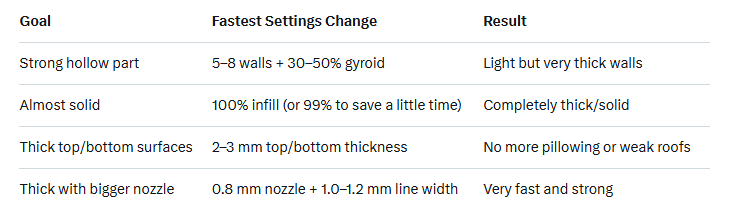
There are several reliable ways to make a 3D print physically thicker/stronger depending on what you mean by "thicker." Here are the most common and effective methods, ranked from easiest to most impactful:
1. Increase Wall Thickness (Perimeters/Shells) – Best for hollow parts
In your slicer (PrusaSlicer, Cura, Bambu Studio, etc.):Increase “Wall Line Count” or “Perimeters” from the usual 2–3 up to 4–8+ ,Or set “Wall Thickness” directly
Result: The outer shells become much thicker while the inside can stay hollow → huge strength gain with minimal extra material/time.
2. Increase Infill Percentage + Change Infill Pattern
a.Default 15–20% → try 40–100% for very thick, solid parts
b.Stronger infill patterns (in order of strength)
c.100% infill = completely solid part (thickest possible)
3. Increase Top/Bottom Layers
a.Default is usually 3–5 layers
b.Change to 8–15+ top/bottom layers (or set top/bottom thickness to 2–4 mm)
c.Makes the top and bottom surfaces much thicker and prevents them from being squishy or breaking through.
4. Use More Nozzle/Line Width (Thicker individual lines)
a.Switch from a 0.4 mm nozzle to 0.6 or 0.8 mm
b.Or just increase “Line Width” in slicer to 0.6–0.8 mm even with a 0.4 mm nozzle
c.Each extruded line is physically wider and taller → thicker walls with fewer perimeters needed.
5. Scale the Model Up in One Axis Only (Vertical or Horizontal Thickening)
a.In your slicer or CAD
b.Warning: This can change proportions; only do this if proportions don’t matter.
Quick Cheat Sheet for “Much Thicker” Prints